Wave Go works right out of the box. You only need to pair manually when you’re adding a second transmitter, replacing a lost transmitter, or if the transmitter and receiver don’t connect on their own.
How to pair a transmitter
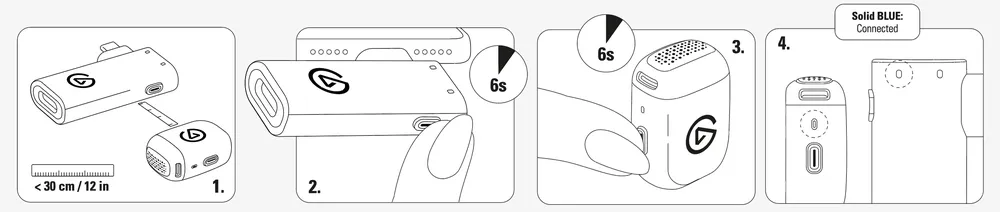
- Place the transmitter within 12 in (30 cm) of the receiver.
- Make sure the receiver is plugged in and the transmitter is powered off.
- Hold the receiver button for 6 seconds until its LED blinks blue rapidly.
- Hold the transmitter button for 6 seconds until its LED also blinks blue rapidly.
- Pairing is complete when both LEDs change from blinking to solid blue.
Two-person recording
Wave Go comes with one transmitter, great for solo recording. For two-person setups, add a second Wave Go TX (sold separately). It pairs with the same receiver using the steps above, so there’s nothing extra to connect.
The second transmitter stores in the Smart Handle, so both charge in the carrying case at the same time. Both appear in the Wave Go app as TX1 and TX2, and audio from both is mixed down into a single mono signal.
Connection troubleshooting
A slow blinking blue light means the transmitter or receiver is searching for its partner. Check that the receiver is fully inserted in your device and the transmitter is powered on and within range. If they still don’t connect, repeat the pairing steps with the transmitter within 12 in (30 cm) of the receiver.
If any assistance is needed, feel free to contact us through the widget at the right.