Note: Wave Link has now been updated to version 3. This reimagining has all-new features and an improved interface overall. Wave Link 3 is free, and will also work with a wide variety of microphones, not just those from Elgato.
Wave Link 2 has reached End of Life. It will still be available for download, but our development focus will be on Wave Link 3 moving forward. We look forward to improve audio for an increasing audience of great creators.
Release Date: 11 November 2026
💻 Download Links
Windows
- Elgato Wave Link 3.5.msix (x64)
- Elgato Wave Link 3.5.msix (arm64)
- Wave Link Stream Deck Plugin 3.4.0.320
What’s new in Wave Link 3.5?
With Wave Link 3.5, fire off sounds from a built-in soundboard, keep your audio on the device you want with Smart Switch, and see where every sound goes with Audio Flow. Running two PCs? Wave Cast now lives inside Wave Link and sends up to five mixes each way between them.
🎛️ Built-In Soundboard
Bring in the clips you already have, trim them to the perfect moment, and play them with a click, a keyboard shortcut or a Stream Deck key. Your soundboard gets its own channel that you can add to any mix, so you decide how loud it is on stream, in voice chat and in your headphones.
- Sort sounds into categories, add fades, or set them to loop.
- Hit shuffle to play a random sound from a category.
- Drag a sound onto the Stream Deck app to set up a key in one move.
🔀 Smart Switch
Plug in a headset and Windows decides where your sound goes, whether you like its pick or not. Now Smart Switch hands that decision to you. Choose which devices matter most, and Wave Link keeps your audio on the top one that’s connected. Pop in your earbuds and your audio moves over. Put them away and it’s back on your speakers.
🗺️ Audio Flow
Not hearing something? Open Audio Flow to find out why. It maps your whole setup, from inputs through channels and mixes to your outputs. Click anything to trace its signal path, and check the issues panel for muted outputs or channels that aren’t routed anywhere.
🖥️ Built-In Wave Cast
You asked to send more than one app’s audio between your PCs. Wave Cast now lives inside Wave Link and sends up to five whole mixes each way, effects and all.
- Send your game, Discord and mic to your streaming PC as separate channels, so you can balance each one for the stream and your recordings.
- Hear stream alerts and chat sounds from your streaming PC in your gaming headset.
- Adjust levels, add channels or create mixes on the other PC without switching computers.
Wave Cast is sold separately on Elgato Marketplace. Both PCs need the same Wave Link version.
💾 Wave Link Backup and Restore
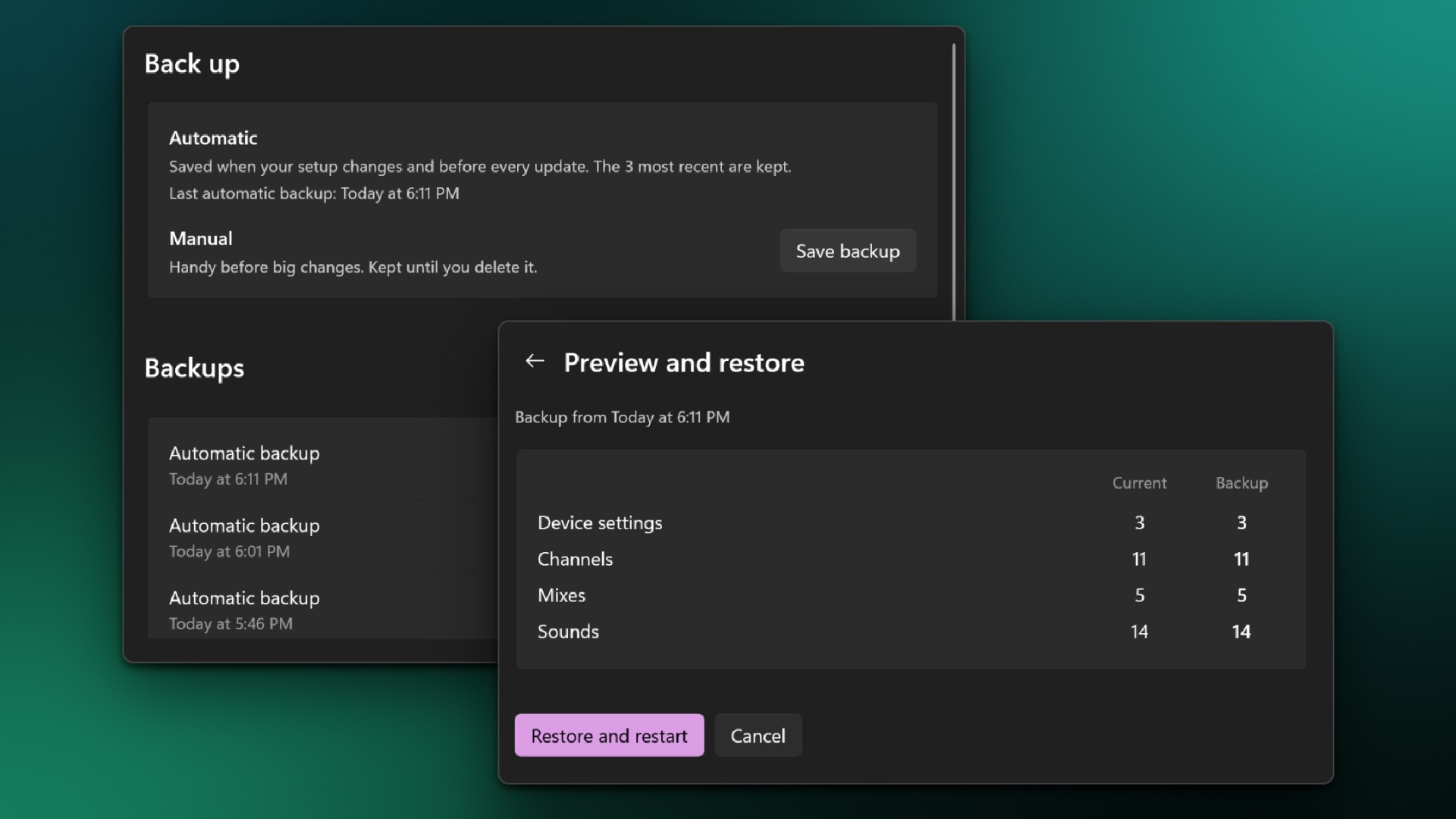
Wave Link now backs up your channels, mixes, device settings and soundboard automatically, including before every app update. Save your own backup before you try something new, and roll back to any of them whenever you need to. Want one setup for streaming and another for work? Save a backup of each and restore the one you need. If you’d like that as proper profiles, let us know.
🎬 OBS Studio Backup and Restore
Some Wave Link driver updates make Windows treat your audio devices as new, and OBS Studio resets your audio sources. Wave Link now backs up your OBS audio setup, saves a fresh backup before an update like that, and offers to restore it afterwards, relinking your devices, levels, track assignments and source and scene audio settings in a few clicks. It takes a one-time connection to OBS Studio 28 or later:
- In OBS Studio, open Tools → WebSocket Server Settings, turn on Enable WebSocket server, and click Show Connect Info to see your port and password.
- In Wave Link, open Settings → OBS Studio, enter the port and password, and connect.
- Turn on Auto-connect on startup. From then on, Wave Link backs up your OBS audio setup automatically.
🎚️ Mixer Listening Control
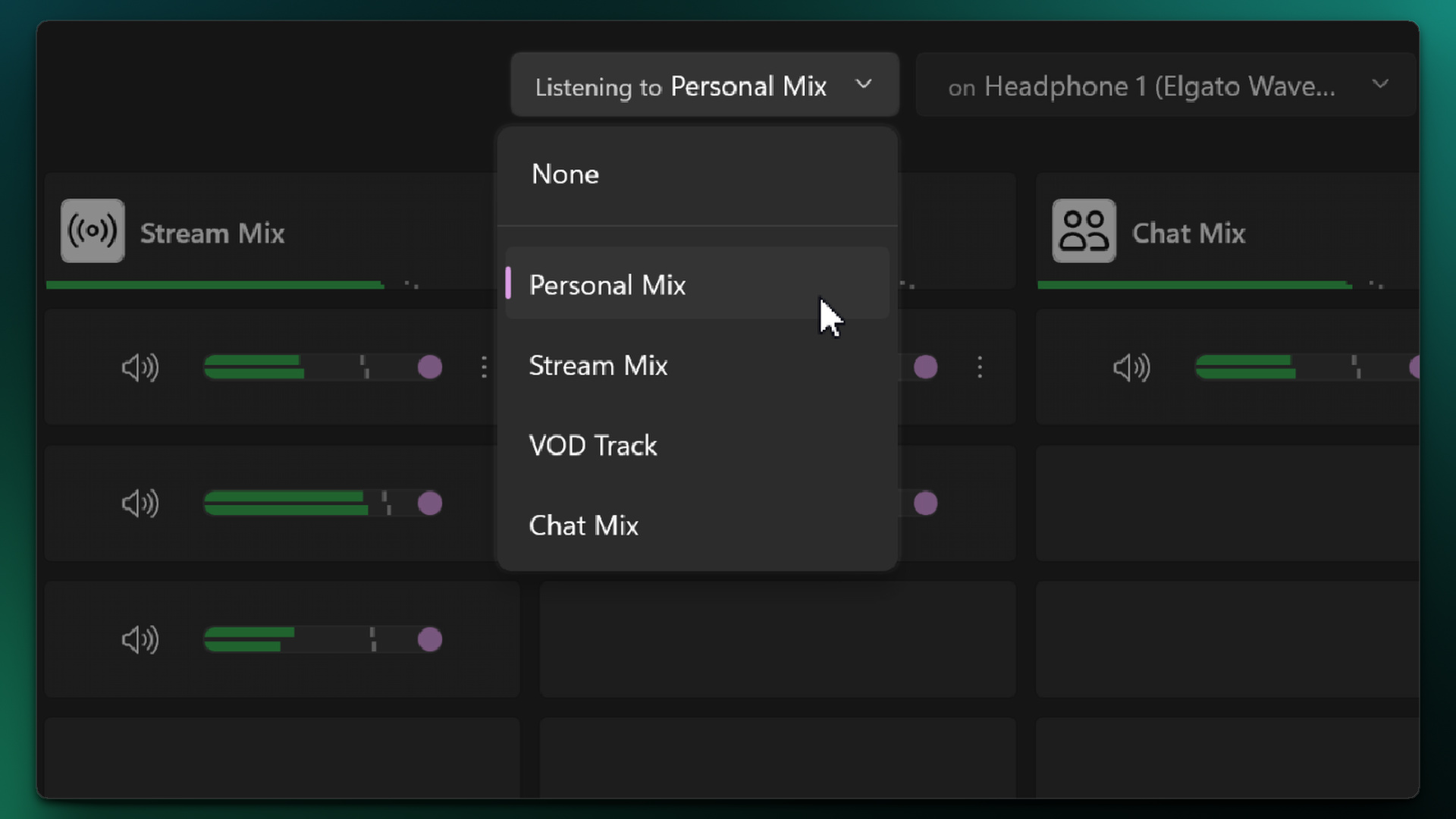
Mixes is now called the Mixer. A new Listening to control in its toolbar shows which mix you hear on your main output device, and switching to another mix takes one click. Wave Link also warns you when no mix is selected or your main output device isn’t available.
↔️ Compact View Layouts
Compact view now comes in a horizontal layout too, so a small, wide mixer can sit on a second screen or a horizontal display like the Corsair XENEON EDGE.
🌐 Language Support
Wave Link is going global, and it now speaks your language. Choose from 14: English, German, French, Spanish, Italian, Dutch, Danish, Swedish, Russian, Portuguese (Brazil), Portuguese (Portugal), Japanese, Korean and Chinese (Traditional). Wave Link follows your system language, or you can pick one in Settings.
🛠️ Improvements & bug fixes
- Channels can now be removed from the right-click menu.
- Dragging channels and mixes to reorder them in the Mixer now shows a preview of the item and exactly where it will land.
- Muted mix headers now turn red, matching muted channels.
- Refreshed icons throughout the app.
- Dialogs with a close button now also close with a click outside them.
- The double audio warning now clears when the mic is muted in the Personal Mix again.
- Wave Link now shows a notification when a driver update is needed, even while it runs in the system tray.
- Fixed an issue that could cause a rare system crash after the PC woke from sleep.
- Fixed a crash at startup that could happen when a virtual audio device failed to start.
- Fixed an issue where Wave Link could freeze when a locked default output device was disconnected and reconnected.
- Fixed an issue where a new mix with no outputs still played audio on the Windows default playback device.
- Fixed an issue where the default output device wasn’t added to the Personal Mix on a fresh install.
- Fixed an issue where Wave Link briefly showed no connected hardware device at startup, even with one connected.
- Fixed an issue where newly installed apps and games didn’t appear in the app list right away.
- Fixed an issue where a channel’s level meters on Stream Deck froze after the channel was reordered.
- Fixed an issue where some muted channels showed a red tile instead of their volume in a mix when volume sliders were hidden.
- Fixed an issue where a Wave device disappeared from the sidebar after its channel was removed and Wave Link restarted.
- Fixed an issue where Wave Link’s virtual audio devices kept a removed channel’s name in Windows.
- Fixed an issue where a custom channel icon turned transparent in the channel dialog when more than three apps were added to the channel.
- Fixed an issue where channel and mix names were too dark or too bright after changing the color theme outside the Mixer.
- Fixed an issue where sidebar icons were off-center in the collapsed sidebar while a Wave device was muted.
- Fixed an issue where reopening Wave Link from the system tray didn’t bring it to the front and shrank the window to its minimum size.
- Fixed an issue where drag and drop from File Explorer could stop working after the driver installer restarted Wave Link.
- Fixed an issue where updating an audio plugin from Elgato Marketplace reset its settings.
- Fixed an issue where Stream Deck didn’t update when the headphone volume was changed in Wave Link.
- Fixed an issue where Stream Deck actions for output devices showed as unavailable after a driver update.
- Fixed an issue where the Wave Control Stream Deck action was missing the Mic/PC Mix option after switching from a Wave XLR Pro to another Wave device.
- Wave XLR Pro: Mix headers now show a badge and tooltip while the hardware mixer is in use.
- Wave XLR Pro: Fixed an issue where “Driver missing” appeared after Windows removed the virtual audio device.
- Wave XLR Pro: Fixed an issue where the screen for switching between the software and hardware mixer didn’t match the rest of the app.
- Wave XLR and XLR Dock (first generation): Fixed an issue where the device page was incomplete after reconnecting.