Note: Wave Link has now been updated to version 3. This reimagining has all-new features and an improved interface overall. Wave Link 3 is free, and will also work with a wide variety of microphones, not just those from Elgato.
Wave Link 2 has reached End of Life. It will still be available for download, but our development focus will be on Wave Link 3 moving forward. We look forward to improve audio for an increasing audience of great creators.
Release Date: 11 November 2026
💻 Download Links
macOS
What's new in Wave Link 3.5 (macOS)?
With Wave Link 3.5 on Mac, fire off sounds from a built-in soundboard, keep your audio on the device you want with Smart Switch, and see where every sound goes with Audio Flow. Own a Wave XLR Pro or Corsair VOXARA? A long list of fixes is waiting for you too.
🎛️ Built-In Soundboard
Bring in the clips you already have, trim them to the perfect moment, and play them with a click, a keyboard shortcut or a Stream Deck key. Your soundboard gets its own channel, so you decide how loud it is on stream, in voice chat and in your headphones.
- Sort sounds into categories, add fades, set them to loop, or hit shuffle to play a random one from a category.
- Drag clips straight into the soundboard to import them, and undo or redo any edit.
- Play sounds from Stream Deck with the updated Wave Link plugin, or drag a sound onto a key in the Stream Deck app to set it up.
🔀 Smart Switch
Connect a headset and your Mac decides where your sound goes, whether you like its pick or not. Now Smart Switch hands that decision to you. Choose which devices matter most, and Wave Link keeps your audio on the top one that’s connected. Pop in your earbuds and your audio moves over. Put them away and it’s back on your speakers.
🗺️ Audio Flow
Not hearing something? Open Audio Flow to find out why. It maps your whole setup, from inputs through channels and mixes to your outputs. Click anything to trace its signal path, and check the issues panel for muted outputs or channels that aren’t routed anywhere.
🎚️ Mixer Listening Control
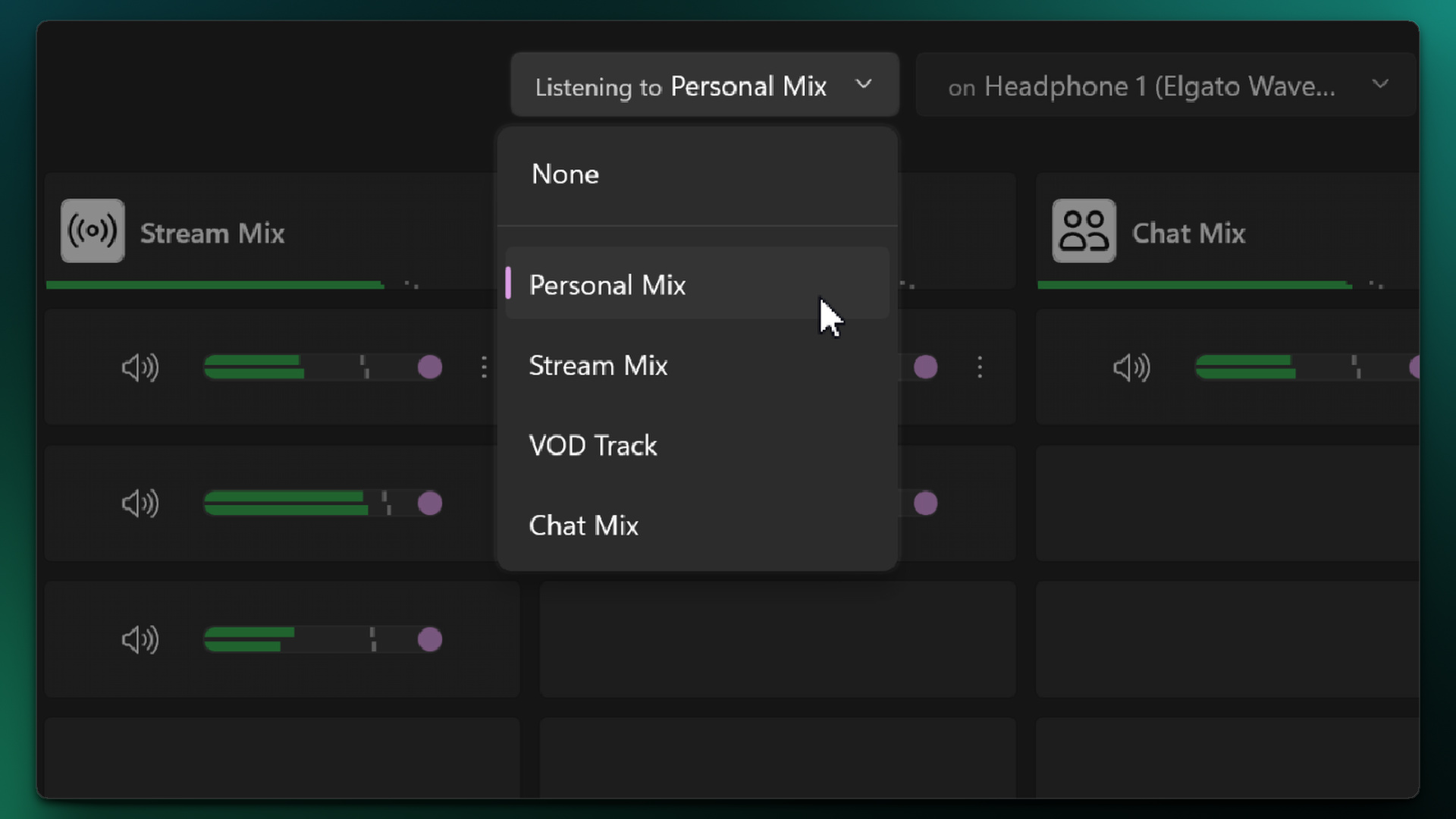
The ear icon is gone. The Mixer toolbar now reads Listening to, followed by two menus: one for the mix you hear and one for the output device it plays on. Switching either takes one click.
🛠️ Improvements & bug fixes
- Cleaned up the sidebar: Mixer, Audio Flow and Soundboard now sit together under Tools.
- Wave Link now warns when an audio effect on a channel is missing or out of date.
- Improved VoiceOver support, with clear labels on close and info buttons and the correct state for Select All in the ducking settings.
- Fixed an issue where a Wave device or Corsair VOXARA channel passed no audio until another channel started playing.
- Fixed an issue where unplugging a hardware audio device could send the audio of other devices to the wrong channels.
- Fixed an issue where audio crackled after the main output’s sample rate changed while Wave Link was running.
- Fixed an issue where effects were processed at the wrong sample rate when the main output wasn’t set to 48 kHz.
- Fixed an issue where mixes on mono output devices played 6 dB too loud.
- Fixed an issue where the headphone volume slider jumped about 1 dB louder at a few positions.
- Fixed an issue where Wave Link asked to install the audio driver even though it was already installed.
- Fixed an issue where the spinner and text on the loading, driver setup and permissions screens were hard to read in light mode.
- Fixed an issue where an output device used by another mix wasn’t listed under Used in other mixes.
- Fixed an issue where a mix’s output warning still said muted after the muted output was unplugged.
- Fixed an issue where Sound Check playback went silent when the output device was changed during playback, for microphones without effects.
- Fixed an issue where the Mixer tutorial could close by itself.
- Corsair VOXARA: Fixed an issue where there was no audio when the VOXARA output wasn’t set to 48 kHz.
- Corsair VOXARA: Fixed an issue where the Wave Control Stream Deck action showed Mic/PC Mix as unsupported.
- Wave Neo: Fixed an issue where the firmware version wasn’t shown and the device onboarding didn’t start on its own.
- Wave XLR MK.2, XLR Dock MK.2 and Wave XLR Pro: Fixed an issue where the Inline Boost Compatibility setting had no effect on the device.
- Wave XLR MK.2: Fixed an issue where mixes could play on one side only and leak into another mix’s output after the audio driver was installed or updated.
- Wave XLR Pro: Fixed an issue where XLR Mic 1, XLR Mic 2, USB AUX and Line In stayed silent in other apps for about 30 seconds after Wave Link started.
- Wave XLR Pro: Fixed an issue where Sound Check for XLR Mic 2 played back XLR Mic 1 on external outputs.
- Wave XLR Pro: Fixed an issue where channels created for the hardware mixer stayed behind when switching to it was cancelled.
- Wave XLR Pro: Fixed an issue where an app could stay silent after being removed from every channel, once Wave Link had switched between the software and hardware mixer.
- Wave XLR Pro: Fixed an issue where the Ducking Speed options read High and Low instead of Fast and Slow.